
How to Check the TM Balance: Load and Data Inquiry Guide
Stay in control of your Touch Mobile account with every verified method explained step by step.
Many TM subscribers run out of prepaid load or mobile data without any warning, which leads to missed calls, failed transactions, and interrupted browsing. Not knowing how to check the TM balance to assess your remaining TM balance at the right moment can cost you more than just convenience. The good news is that Touch Mobile gives you multiple fast and easy ways to check your TM balance without any technical knowledge. This guide covers every verified method, so you always stay updated and in control of your account.
Whether you prefer a free USSD code, a quick SMS, a phone call, or the GlobeOne App, each method works on any TM prepaid SIM in the Philippines. Pick the one that fits your phone and situation, and you will never be caught off guard again.
How to Check the TM Balance via USSD Code? (Free Method)
The fastest and completely free way to check your TM balance is by dialing *143# directly from your phone. No internet connection is required, and no fee is deducted from your TM load, making it the most practical option for any situation.
Follow these steps to check your balance using *143#:
- Open your phone dialer.
- Type *143# and press call.

- Select My Account from the menu.

- Select Balance Inquiry.

- Your remaining TM load balance appears on the screen instantly.

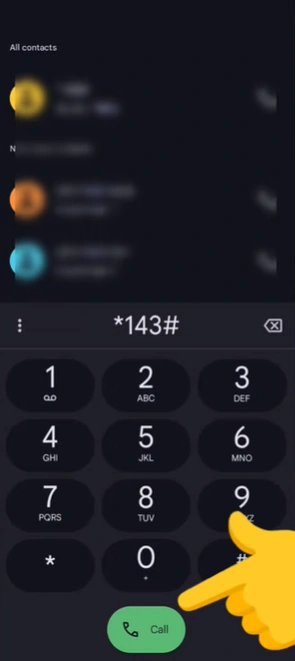
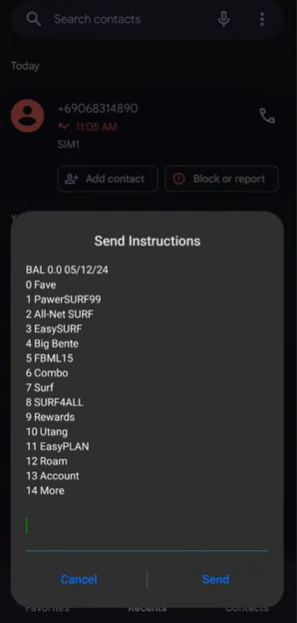
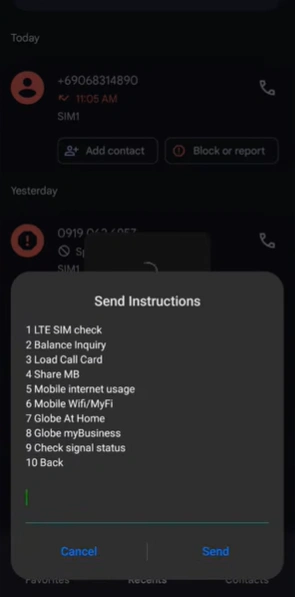
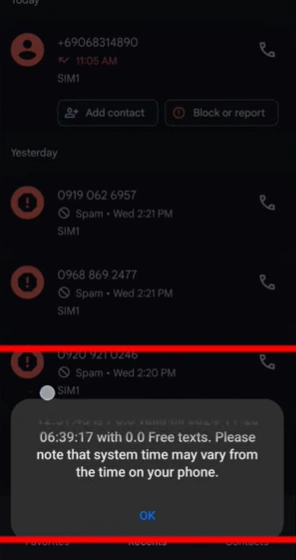
This method works on all phone models, including basic feature phones. Since it runs entirely on the Globe network through a USSD code Philippines system, it does not need Wi-Fi or mobile data to function.
How to Check the TM Balance via SMS?
You can also check your TM load balance by sending a text message to 2888. This method works without an internet connection and delivers your balance details directly to your inbox within seconds.
Follow these steps to check via SMS:
- Open your Messages app.
- Type BAL in the message field.
- Send it to 2888.
- Wait for the reply showing your remaining load, active TM promo, and validity date.
Keep in mind that this TM balance inquiry via text may deduct a small fee of around PHP 1.00 per inquiry. If you want to avoid any deduction, use *143# instead for a completely free TM balance check.
How to Check the TM Balance by Calling 222?
If you prefer to hear your balance out loud, you can dial 222 directly from your TM mobile number. The automated voice system announces your TM remaining load within seconds of connecting.
Follow these steps to check via call:
- Open your phone dialer.
- Dial 222 and press call.
- Listen to the automated voice instructions.
- Your TM load balance is announced clearly during the call.
This method is especially useful for subscribers who find it easier to listen rather than read small screen text. Note that a small fee may apply, so use this when a quick voice confirmation is what you need.
How to Check the TM Balance Using the GlobeOne App?
The GlobeOne App is the most detailed way to monitor your TM prepaid balance. It shows your load balance, remaining mobile data Philippines, active promos, and validity all in one dashboard without requiring you to dial or text anything.
Follow these steps to check your balance on the GlobeOne App:
- Download the GlobeOne App from the Google Play Store or Apple App Store.
- Open the app and register using your TM number.
- Log in to your account.
- Your TM balance and data usage appear directly on the home screen.
The app requires an internet connection or Wi-Fi to load your account details. It is the best option for TM subscribers who want to track their TM load expiry, manage TM promo subscriptions, and enable balance alerts all in one place.
How to Check the TM Balance on Older Phones Using SIM Toolkit?
If you are using an older or basic mobile device, the SIM Toolkit or TM Menu built into your phone gives you a direct way to check your balance without needing the internet or a data connection. This option is often overlooked but works reliably on feature phones.
Follow these steps to use the SIM Toolkit:
- Open the SIM Toolkit or TM Menu app on your phone.
- Select Prepaid Services.
- Choose Check Balance.
- You will receive an SMS confirming your current TM load balance.
This method is completely free and does not deduct any amount from your PHP load balance. It is a practical backup option when other methods are unavailable on your device.
How to Check the TM SIM Data Balance?
Your TM data balance is separate from your load balance, and checking it requires a different code or number. To see your remaining mobile data, text DATA BAL to 8080 from your TM SIM. You can also text EZ INFO or SURF BAL to 8080 to view the details of your active promo, including how much data is left and when it expires.
If you prefer not to text, dial *143# and select Data Balance from the menu, or open the GlobeOne App for a combined view of both your load and TM data balance in one screen.
TM Load Balance vs. TM Data Balance
Many TM subscribers confuse load balance with data balance because both affect what you can do on your phone. Understanding the difference helps you check the right thing at the right time.
Here is a quick breakdown:
| Query | TM Load Balance | TM Data Balance |
|---|---|---|
| What is it? | Monetary credit in PHP | Internet data in MB or GB |
| What is it used for? | Calls, SMS, promo subscriptions | Browsing, apps, streaming |
| How to check? | Text BAL to 2888 or dial *143# | Text DATA BAL to 8080 or dial *143# |
| Combined view | GlobeOne App | GlobeOne App |
Tips to Manage Your TM Balance
Staying on top of your TM prepaid balance prevents unexpected service interruptions. These simple habits will help you avoid running out of load or data at the wrong moment.
- Check your TM balance at least once a week using *143#, since it is completely free
- Enable low balance alerts through the GlobeOne App so you get notified before your load runs out
- Text SURF BAL or EZ INFO to 8080 regularly to track your active TM promo before it expires
- Always keep your TM SIM registered under the SIM Registration Act Philippines to ensure all TM balance inquiry features remain active
- Use the GlobeOne App for a full dashboard view of your load, mobile data, and promo details in one place
- Note your TM load expiry date from the 2888 reply and renew your promo before it lapses
Frequently Asked Questions
Related Guides
Explore more helpful TM tutorials to get the most out of your prepaid SIM.
Conclusion
Checking your TM balance takes less than a minute when you know how to check the TM balance and use the right method for your phone and situation. You may dial *143# for the fastest free inquiry, or use the GlobeOne App if you want a full view of your load, data, and active promos in one place. Moreover, you can text DATA BAL to 8080 for data specific checks so you always know exactly how much internet you have left. Staying updated on your prepaid load inquiry keeps you connected and prevents any surprise service interruptions on the Globe network.