
How to Pasaload TM: Complete Guide to Sharing Load
Many TM subscribers do not know how to Pasaload TM and end up unable to help a friend or family member who has run out of load at a critical moment. Missing a call or losing internet access because of an empty balance is frustrating, especially when someone nearby has more than enough load to share. The good news is that TM Pasaload lets you transfer load instantly to any TM or Globe number using multiple methods directly from your phone.
Every method, whether you prefer a USSD code, an SMS, the GlobeOne App, or GCash, is free to set up and takes only a few steps to complete. Read through the full guide you will be able to send load in under a minute using whichever method works best for your phone and situation.
What Is TM Pasaload and Why Do You Need It?
TM Pasaload is a load sharing service that lets any active TM prepaid subscriber instantly transfer part of their balance to another TM or Globe number without visiting a store or buying a physical load card. It was designed for moments when someone runs out of balance and needs to stay connected immediately, whether for an urgent call, mobile data access, or an important transaction.
There are many everyday situations where TM Pasaload becomes essential for TM subscribers across the Philippines. A family member may need emergency load to call for help, a student may need data to submit an online requirement, or a friend may be stranded with no way to reach a load retailer nearby. Pasaload removes that barrier instantly and keeps everyone connected regardless of their situation.
What You Need Before You Pasaload TM?
You must ensure that the following requirements are in place before you learn how to Pasaload TM to avoid a failed transaction. Missing any one of these is the most common reason TM Pasaload does not go through on the first attempt.
- An active and SIM-registered TM prepaid number.
- Enough prepaid load balance to cover the amount you want to send plus the ₱1 service fee.
- The correct11-digit mobile number of the recipient.
- The recipient must also be on an active TM or Globe prepaid number.
- An internet connection if you plan to use the GlobeOne App or GCash.
How to Pasaload TM to TM Using the *143# Code?
The *143# USSD code is the most reliable method to Pasaload TM to TM because it works on any phone without an internet connection. It is the best option for basic or feature phones and for users in areas with limited data coverage.
Follow these steps to Pasaload using *143#:
- Open your phone dialer and dial *143#.
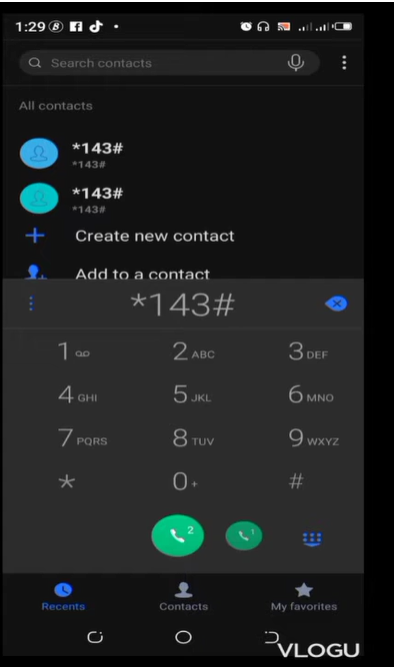
- Select My Account from the menu.
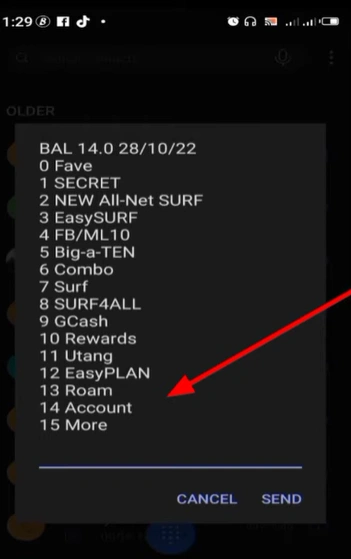
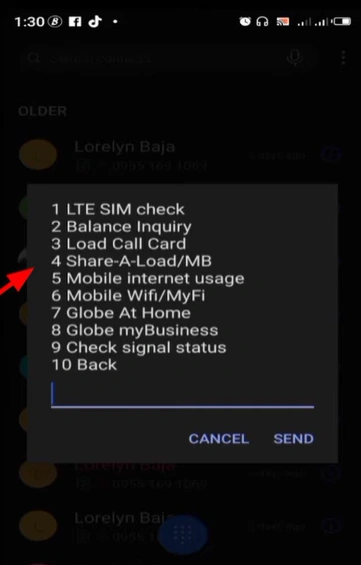
- Tap Share a Load or Pasaload.
- Enter the amount you want to send, such as ₱10, ₱20, ₱50, or ₱100.
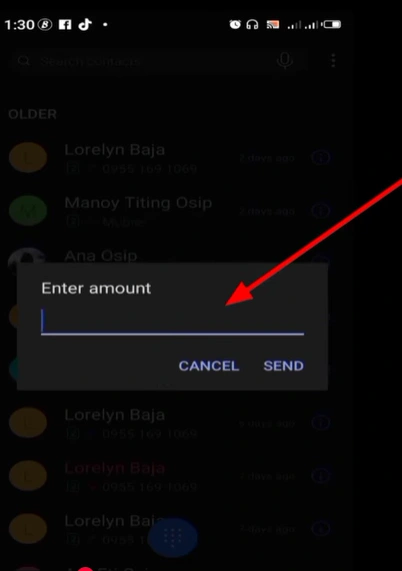
- Enter 10 digits mobile number

- Confirm the transaction and wait for the confirmation SMS.
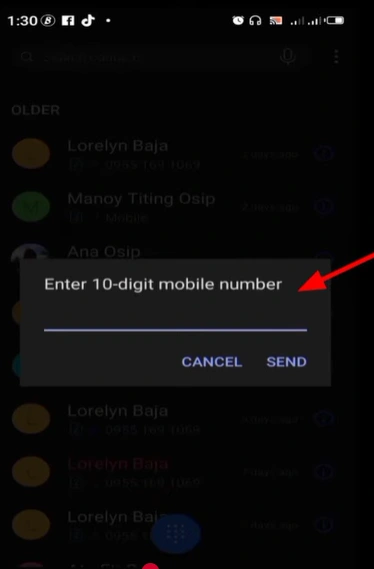
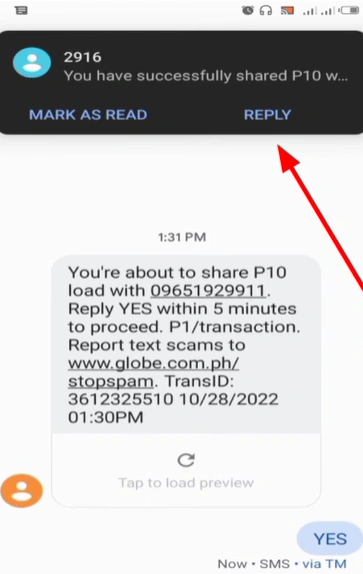
Type yes, to confirm you really want to share balance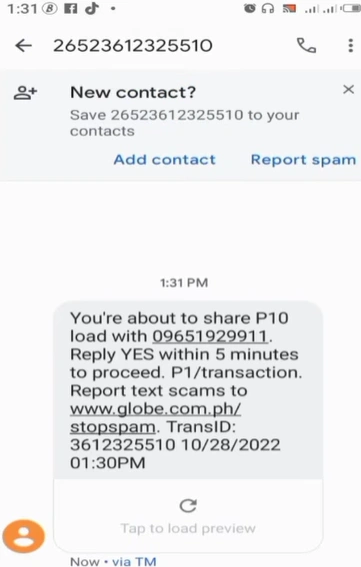
A ₱1 service fee is deducted from your balance along with the amount you send. Both you and the recipient will receive a confirmation message once the transfer is complete.
How to Pasaload TM to TM or Globe via SMS?
The SMS method is a quick way to send the load in TM without navigating any menu, making it ideal when you need to transfer the load in seconds. It works on all phones, including the basic keypad models, without any app or internet required.
Follow these steps to Pasaload via SMS:
- Open your Messages app.
- Type the amount followed by a space and the recipient’s number. Example: 50 09171234567
- Send the message to 808.
- Wait for a confirmation SMS reply from TM.
- Reply YES within 5 minutes to complete the transaction.
If you do not reply YES within the 5-minute window, the transaction expires automatically, and no load is deducted from your balance. A ₱1 service fee applies per successful transaction.
How to Pasaload TM Using the GlobeOne App?
The GlobeOne App is the recommended method to Pasaload TM for smartphone users because it tracks your transaction history and requires no codes or SMS formats to remember. It also does not charge a ₱1 service fee, making it the most cost-efficient option for frequent senders.
Follow these steps to Pasaload using the GlobeOne App:
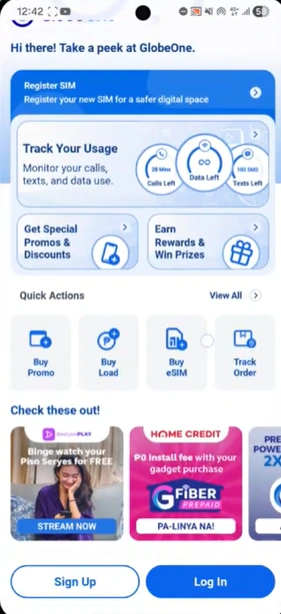
- Download the GlobeOne App from the Google Play Store or Apple App Store.
- Open the app and log in using your TM mobile number.

- Tap Buy Load or Share Load on the home screen.

- Select Other Account and enter the recipient’s TM or Globe number.
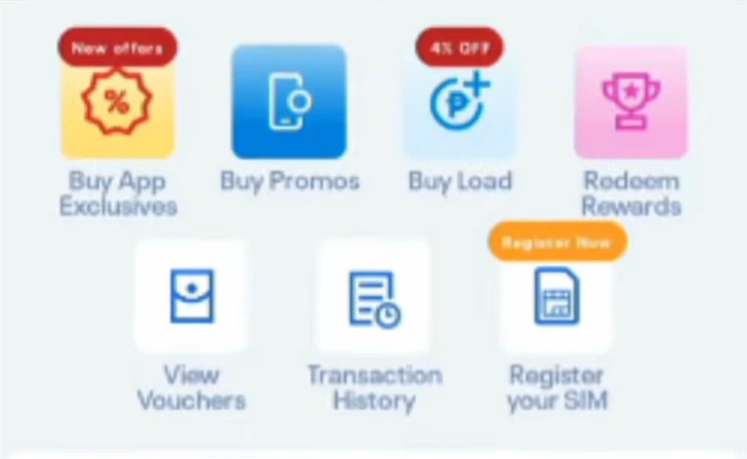
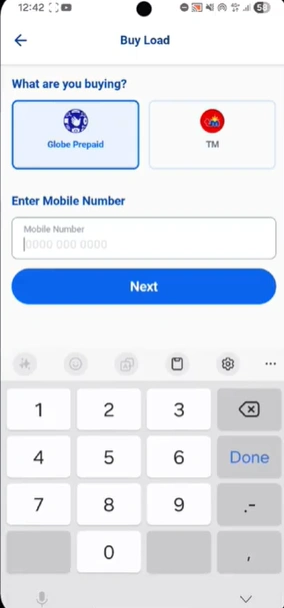
- Choose the load amount you want to send.

- Review the details and tap Confirm.
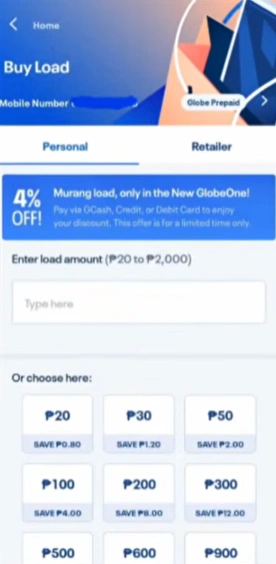
Both you and the recipient receive a confirmation notification instantly after the transaction is complete. You can also view your full transaction history under the Activity tab in the app.
How to Pasaload TM Using GCash?
GCash is another free and reliable way to transfer load from TM to any Globe or TM prepaid number without a ₱1 service fee. It uses your GCash wallet balance instead of your prepaid load, so your TM balance stays untouched.
Follow these steps to Pasaload using GCash:
- Open the GCash app and log in to your account.
- Tap Buy Load on the home screen.

- Enter the recipient’s TM or Globe mobile number.

- Select the load amount or promo you want to send.

- Confirm the payment from your GCash wallet balance.

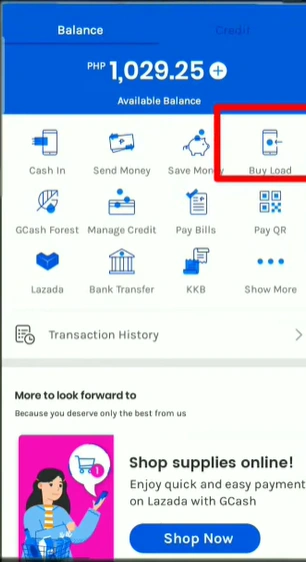
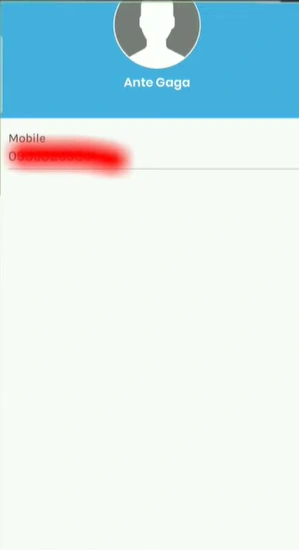
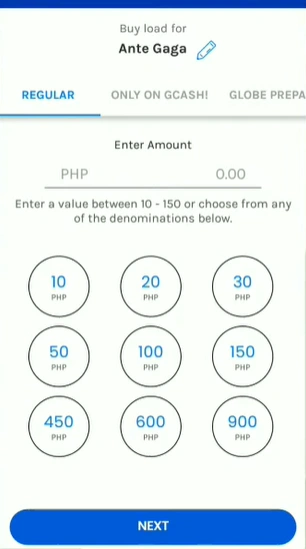
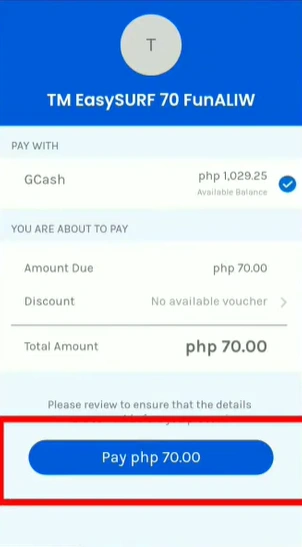
The load is transferred instantly, and both sender and recipient receive a confirmation message. Make sure your GCash wallet has enough balance to cover the full amount before confirming.
How to Transfer Load Using a TM Retailer SIM?
A TM retailer SIM is used by authorized load sellers and shopkeepers to transfer load in larger amounts directly to any TM or Globe prepaid number. This method does not require a PIN and the load is transferred instantly without any app or internet connection.
Follow these steps to transfer load via a TM retailer SIM:
- Visit a nearby TM load retailer or mobile load shop.
- Provide your TM mobile number and the amount you want transferred.
- The retailer sends the load directly from their system to your number.
- You receive a confirmation SMS once the transfer is successful.
- Pay the retailer the load amount plus any applicable service charge.
This method is the best option when you need a larger load transfer or when standard methods are unavailable due to network issues.
Can You Pasaload TM to Other Networks?
TM Pasaload is fully supported between TM to TM and TM to Globe numbers since both networks operate under Globe Telecom. You can use any method in this guide including *143#, SMS to 808, the GlobeOne App, or GCash to send load between these two networks without any restrictions.
Direct Pasaload to Smart, TNT, Sun, or DITO numbers is not supported through standard *143# or SMS methods in 2026. If you need to send load to these networks, use the GCash Buy Load feature or other digital wallets like Maya or ShopeePay, which support cross-network load transfers to any Philippine mobile number.
TM Pasaload Fees, Limits, and Transaction Details
Understanding the fees and limits of TM load sharing before you send helps you avoid failed transactions and unexpected deductions. Here is a complete breakdown of everything you need to know.
| Detail | Information |
| Service fee via *143# or SMS | ₱1 per transaction |
| Service fee via GlobeOne App or GCash | Free |
| Minimum Pasaload amount | ₱1 |
| Maximum per transaction | ₱150 |
| Daily Pasaload limit | ₱150 to ₱500, depending on the account |
| Transaction speed | Instant upon confirmation |
| Reversible | No, all transactions are final |
| Supported networks | TM and Globe prepaid only |
Always keep at least ₱1 extra in your balance beyond the amount you want to send to cover the service fee when using *143# or SMS.
How to Check Your TM Pasaload Transaction History?
You can verify the transaction through any of the following methods after completing a TM load transfer to confirm it was successful.
- Dial *143#, select My Account, tap Share-A-Load or Promo, then tap Inquiry
- Open the GlobeOne App and check the Activity tab for a full list of recent transactions
- Check your SMS inbox for the confirmation message sent by TM after every successful Pasaload
TM Pasaload Not Working? Common Problems and Fixes
TM Pasaload errors are usually caused by one of a small number of fixable issues. Here are the most common problems and exactly how to resolve them.
Insufficient Balance
Your total balance must cover the load amount plus the ₱1 service fee, or the transaction will fail automatically. Check your balance by dialing *143# and selecting Check Balance before attempting to send.
Incorrect Recipient Number
Always enter the number in the correct 10-digit format starting with 09 and double-check every digit before confirming. A Pasaload transaction is instant and irreversible, so sending load to a wrong number cannot be undone.
Daily Limit Reached
TM sets a daily Pasaload limit of up to ₱150 per transaction and ₱500 per day, depending on your account type. Wait 24 hours for the limit to reset before attempting another transfer.
Inactive or Unregistered SIM
Both the sender and recipient must have an active SIM-registered TM prepaid number under the SIM Registration Act, Philippines, or the Republic Act 11934. Contact Globe Telecom at 211 free of charge if your SIM status is unclear.
Network or System Error
Move to an area with a stronger LTE signal coverage, toggle airplane mode on and off, and wait two to three minutes before trying again. If the error continues, switch to the GlobeOne App or GCash as an alternative method.
Frequently Asked Questions
Q1. How do I Pasaload TM to another TM number?
Ans. Dial *143#, select My Account, tap Share a Load, enter the recipient’s number and amount, and confirm. You can also text the amount and number to 808 or use the GlobeOne App to complete the transfer.
Q2. Can I Pasaload TM to a Globe number?
Ans. Yes, TM Pasaload works seamlessly for any active Globe prepaid number using the same methods since both networks are under Globe Telecom.
Q3. What is the service fee for TM Pasaload?
Ans. The fee is ₱1 per transaction when sending via *143# or SMS to 808. Using the GlobeOne App or GCash to send load carries no additional service fee.
Q4. Can I cancel a TM Pasaload transaction?
Ans. No, all TM Pasaload transactions are instant and irreversible once confirmed. Always double-check the recipient number and amount before tapping confirm.
Q5. Why is my TM Pasaload not working?
Ans. The most common causes are insufficient balance, an incorrect recipient number, a reached daily limit, or a weak network signal. Check your balance via *143# and verify the recipient number before trying again.
Q6. What happens if I do not reply YES to the SMS confirmation?
Ans. The transaction expires automatically after 5 minutes and no load is deducted from your balance. You will need to start the process again from the beginning.
Conclusion
Learning how to Pasaload TM is simple once you know which method fits your phone and situation best. You can use *143# for a quick offline transfer, the GlobeOne App for a free and trackable transaction, or GCash to send load across different networks without restrictions. Always verify the recipient number and check your balance before confirming since all TM Pasaload transactions are instant and cannot be reversed. Keep this guide handy and you will never be caught unable to help someone who needs load at the right moment.